Click Create a new wallet, you will be asked to set up a passcode, then save and enter 12 secret phrases to complete creating a new wallet.

Buy USDC with NGN on Remitano
To buy and sell shoes on STEPN, you need a certain amount of USDC. You can buy USDC with NGN on Remitano and transfer it to your wallet at STEPN.
With Swap feature, you can buy SOL directly with NGN with just 3 simple steps.
At home page, select SOL:

You will receive USDC in your wallet immediately when the transaction is completed.
Transfer USDC from Remitano wallet to STEPN wallet
Step 1: In STEPN Wallet interface, select Receive or click on USD coin icon and then click "Receive".
Step 2: Click Copy Address to copy the wallet address displayed on the screen.

Step 3: From Remitano app, click on the menu and select Wallet.
Step 4: At USD coin wallet, click Withdraw
Step 5: Paste your USDC wallet address on STEPN
Step 6: Enter the amount of USDC you want to transfer into STEPN and click Submit to complete

Note: You can choose to Save the above address with the name STEPN for faster withdrawal next time, no need to start over.
Withdrawing USDC from STEPN wallet to Remitano wallet
You can transfer USDC from STEPN wallet to Remitano wallet and sell NGN according to the following instructions.
Step 1: From the Remitano app, choose Wallet, select USD coin and click Deposit
Step 2: Select Network as SOLANA.
Step 3: Copy your Remitano USDC wallet address, then send USDC from STEPN wallet to this wallet address to execute the deposit order.
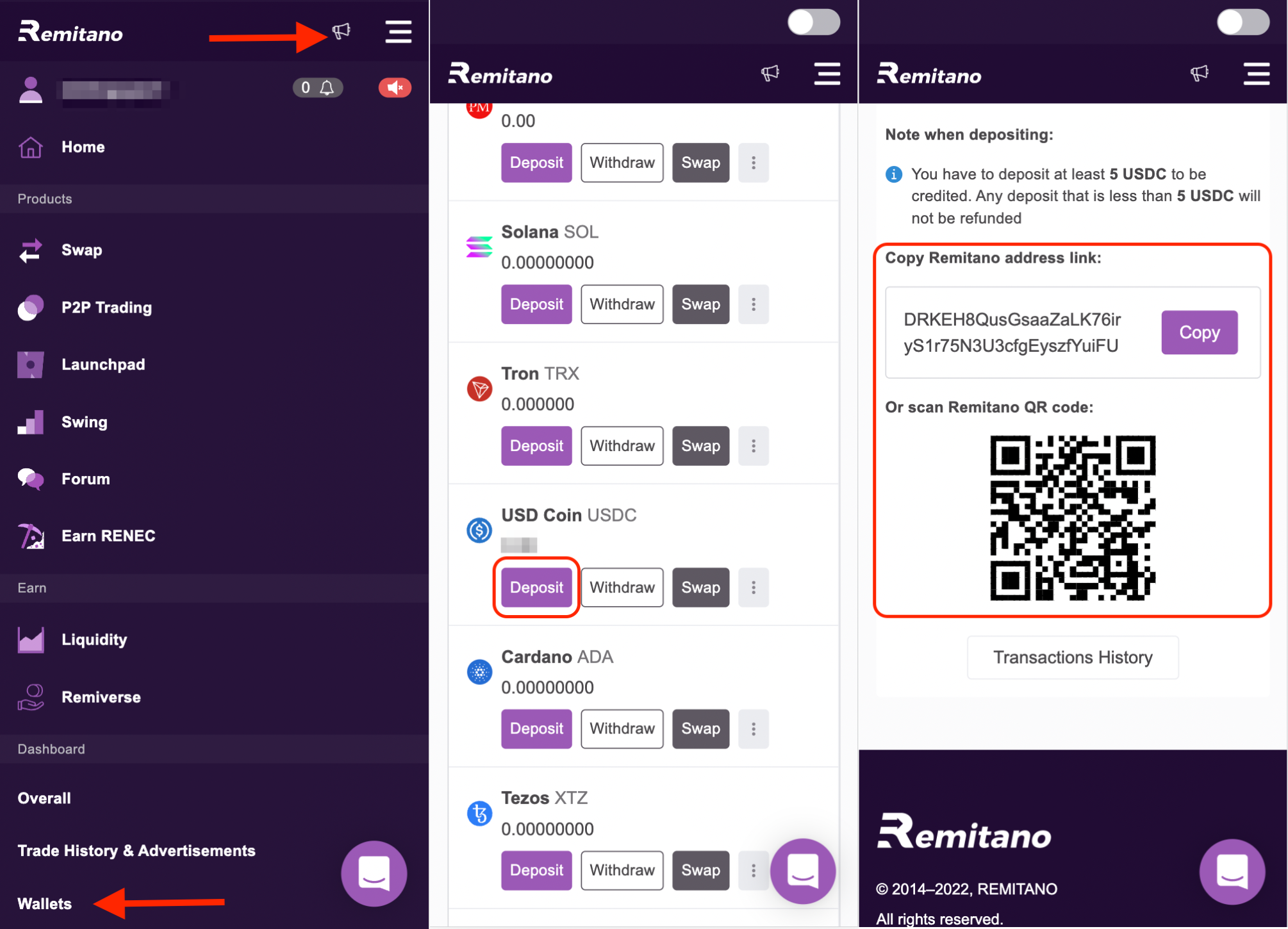
Step 4: In the Wallet interface of STEPN, select Transfer → To External.
Step 5: Select the asset you want to withdraw (USDC).
Step 6: Enter the wallet address as well as the amount of coin/token you intend to withdraw. Note to check the correct network before withdrawing coins/tokens from the wallet to avoid loss of assets.

You can then use Remitano's Swap feature to convert from USDC to NGN or another coin.
Good luck.